
Basic and Advanced mode
CookieTractor fully implements Google Consent Mode v2 and runs in Advanced mode by default.
Advanced Mode
In Advanced mode, tags from e.g. Google Analytics and Google Ads should be loaded when the visitor opens the website and will operate without storing any cookies. If consent is given, these tags will change their behaviour and start using cookies.
In Advanced mode, CookieTractor will automatically set the default consent state when the page loads and update it when the visitor gives consent.
Basic Mode
When running Google Consent Mode in Basic Mode, Google tags will not be loaded when the visitor opens the page.
Once consent is given, the consent default state should be set and a consent update should be set to update the consent state. After this Google tags should be loaded.
CookieTractor will automatically set and update the consent state when running in Basic mode.
CookieTractor with script-tag
When CookieTractor is added to the website using our script tag, you can toggle between the modes using the data-gcm-mode attribute.
We support the following values:
- advanced - Advanced Mode
- basic - Basic Mode
- disabled - Google Consent Mode is disabled and no consent state is set.
By default, CookieTractor uses Advanced Mode. Therefore, not using the attribute has the same effect as setting it to advanced.
Configuring basic mode
<!-- Use Basic mode, with Google Consent Mode -->
<script src="cookietractor.js" data-gcm-mode="basic" ... />
When running in Basic Mode, you can implement tag blocking by using Tag Attributes or with Javascript Events and Functions.
Disable Google Consent Mode
Set the attribute to disabled to disable the consent mode default and update commands.
<!-- Disable Google Consent Mode -->
<script src="cookietractor.js" data-gcm-mode="disabled" ... />
After disabling Google Consent Mode, you can implement tag blocking by using Tag Attributes or with Javascript Events and Functions.
CookieTractor with GTM Tag Template
If you've added CookieTractor to your website using our Google Tag Manager Tag Template, you can run Google Consent Mode in Advanced mode by checking Enable Google Consent Mode inside our Tag Template:
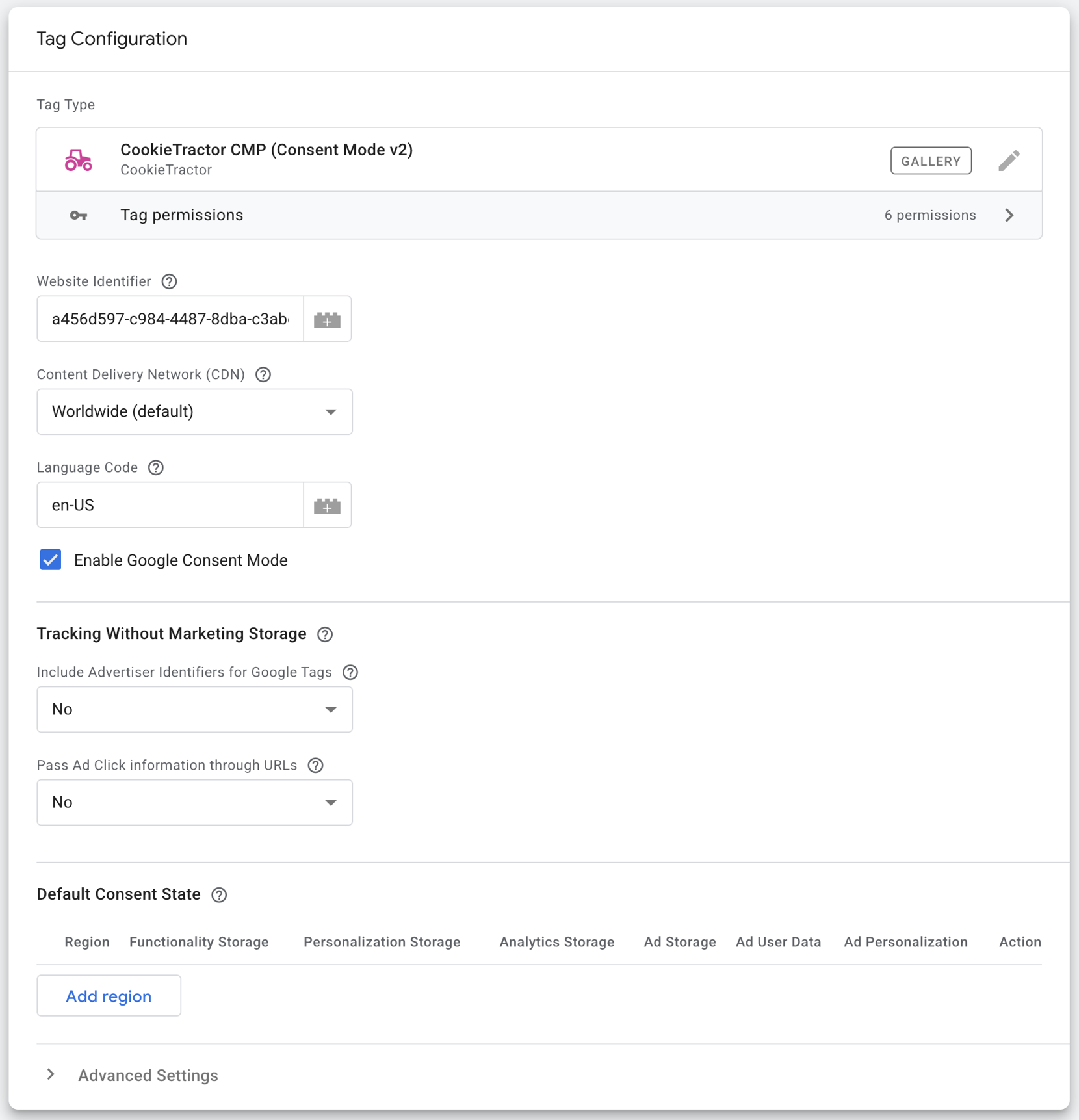
Ensure that the Cookie Tractor Tag is fired using the Consent Initialization - All Pages trigger. Any tags that support Google Consent Mode should use the All Pages trigger.
See our guide on setting up CookieTractor with Google Tag Manager and Google Consent mode for more details.
Related information
Support
Do you have questions about Google Consent Mode or Google Tag Manager for your installation? Feel free to contact us at google@cookietractor.com. Google does not provide direct support for the product – support should primarily go through us.